
How I Use AI: What Works for Me

Last weekend, I took a road trip across Florida to watch the launch of the Roman telescope at Cape Canaveral. While driving, I talked with Hermano, an AI agent I installed on my home server. The agent was running on a computer in Brazil; I was in the middle of Florida, sending voice messages from my car. Even so, I managed to work with it on a surprising number of tasks: developing automations and performing various kinds of maintenance on my server.
Although these tasks are relevant only to someone who has spent many years accumulating gadgets and hardware as a technology enthusiast, I see them as a proxy for computers’ growing ability to use themselves. It is no coincidence that a central part of the marketing message for this week’s GPT-6 announcement was that “Anything you can do on a computer, Astra can do for you. Fast.”
AI has commanded a significant share of everyone’s attention since the end of 2022. For me, that attention skyrocketed in 2026 after, following the Claude Code “boom” late last year, David, Nubank’s CEO, announced that we were all-in on AI. From then on, with the privilege of having essentially unlimited access to the most capable models, I incorporated AI into every digital surface of my life. Recent experiences like the one on the road and others have made me feel firsthand the magic (that really is the word) of the “frontier”; but for that to happen, having access to the models alone was not enough. I also needed the pieces around them to work well together.
The idea behind this text is to share my experience and what has worked for me, thinking it may be useful to other people with different levels of familiarity with AI. I do not consider myself an expert, just someone who has invested many hours interacting with models over the past few years. I am certain that by applying these simple recommendations, you will see an exponential increase in the return you get from the models.
1. Use Markdown for your sovereign knowledge base
The first piece is to have a knowledge base made of Markdown files.
Markdown is a lightweight text format that supports basic formatting syntax, such as headings, bold text, and bullet points. You can open these files in different programs. I use Obsidian, but the application matters less than the principle: the files live in a folder you control, and the AI tools always work in that folder.
This may seem like a technical detail, but it changes your relationship with the tool. We are so used to Google Docs, Office 365, and cloud applications that even the concept of keeping files in a local folder seems old-fashioned. For me, it has become central again.
The folder ensures that the context is mine. I am not locked into OpenAI’s, Anthropic’s, or Google’s application. I can switch models and keep pointing the new tool to the same files. This flexibility matters because the relative quality of models changes very quickly. One quarter, Gemini seems better. Then Claude. Now ChatGPT.
In the long run, the greater value lies in this curation done by you. Models will keep improving. If I cultivate my own files, organized and backed up, every future generation of models will be able to work with better context than the one before it. The investment is not trapped in the history of a chat or a specific vendor. It accumulates in a knowledge base I carry with me.
I maintain one personal knowledge base and one professional one. This separation exists for confidentiality. Aside from that boundary, I try to avoid fragmenting context across several places. This concentration brings risks, so it requires backup and clear access rules, but it is still the best way I have found to make AI deliver hyper-personalized value for my context with minimal effort.
To sync these files across devices, I use Google Drive and Obsidian Sync. I prefer this as the main layer of my personal knowledge base because it is less technical, supports binary files such as spreadsheets, and lets me open some formats directly in Google Docs. On my phone, I use Obsidian for easy access to the Markdown files.
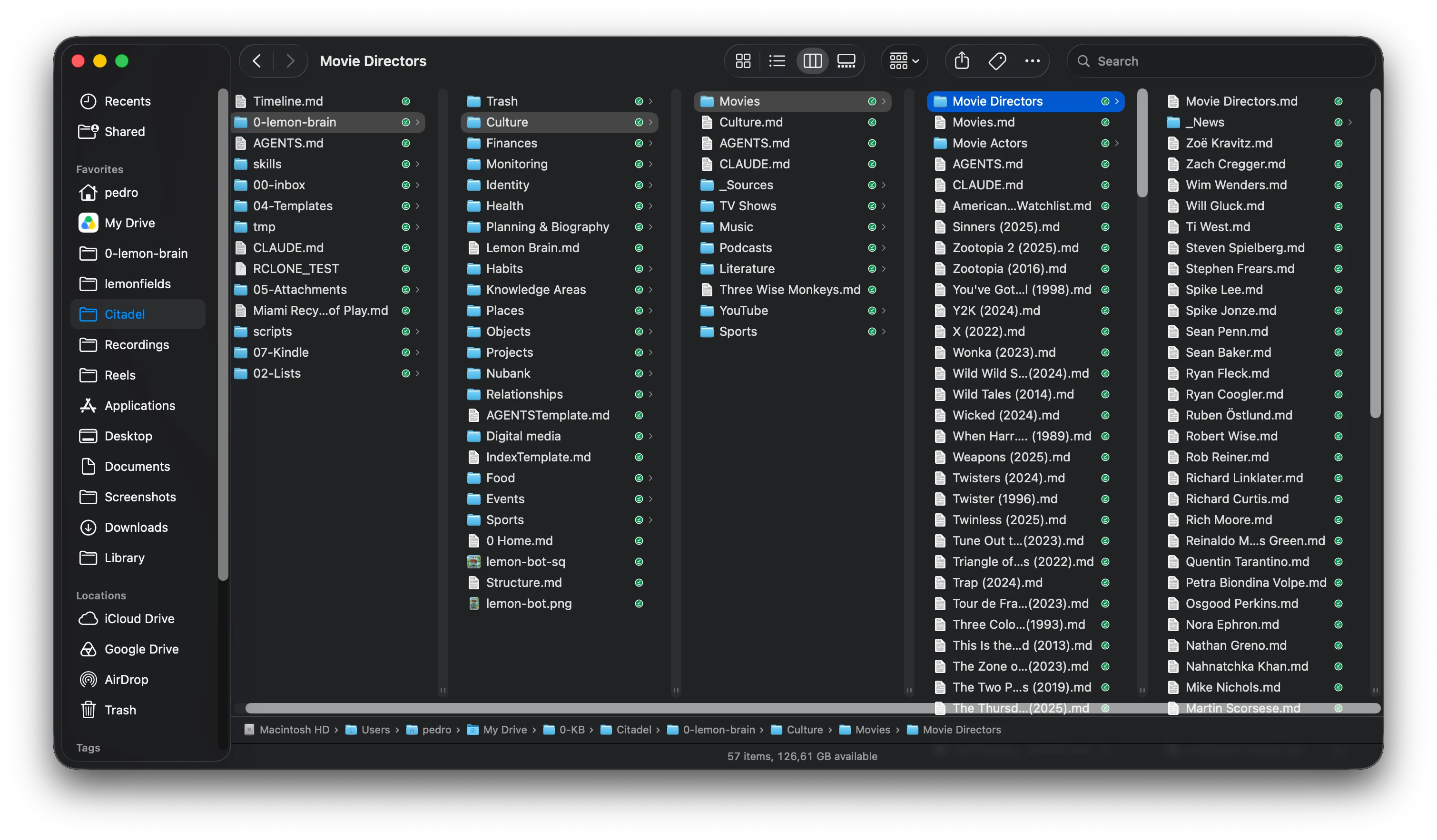
2. Leave trails for AI to follow
The second piece is to leave trails (“breadcrumbs”) for AI.
A new session does not naturally carry the baggage of the previous session. Some products already offer memory tools, but they do not replace complete, reliable, and portable context. Without instructions cultivated by you, the tool starts out knowing very little about who you are, what you are doing, which goals matter, and how you prefer to work.
That is why the instructions loaded at the start of each session have a broad effect on the quality of the responses. They keep me from having to repeat the same explanations, preferences, and definitions, and they help the model get to the right subject faster with minimal effort.
I organize these instructions by domain. Planning a trip requires preferences about activities, food, transportation, and itinerary format. Maintaining a home server requires documentation, architecture, commands, and security rules. The agent does not need to load every travel preference when it is maintaining my server.
In practice, I use an AGENTS.md file as the main source. The name varies by tool: Codex recognizes AGENTS.md, Claude Code uses CLAUDE.md, and Gemini CLI uses GEMINI.md. I chose AGENTS.md as the canonical file and use small files that point to it to ensure compatibility with the others.
That main file, which sits at the root of the folder, includes things such as the structure of the knowledge base, rules for using connectors, basic information about the environment, and the requirement to load more specific instructions when the work enters a particular domain. This main file is loaded at the start of every new session and directs the model to the others within each subdirectory.
I emphasize that the quality of these instructions matters a lot, for better or worse. A good instruction improves every future session. A bad instruction harms all of them too. I have seen the agent take completely wrong paths because a rule was poorly written or outdated. Curating this AGENTS.md file means both adding what is missing and removing what is no longer true. The maxim that “less is more” also applies.
Here are some examples of the most important rules I use, which you can use as seeds to plant your own knowledge base:
- This is Pedro's personal knowledge base, called **PKB**. It covers every **personal** domain of his life, each containing a folder with an index and specific instructions to that domain.
- **The vision:** durable, model-portable markdown context about Pedro's life that (a) any current or future AI can consume directly, (b) powers background routines that improve his life, and (c) feeds itself from his digital footprint (receipts, voice memos, transcripts). Prefer plain markdown + frontmatter over anything tool-specific.
- For every user query—before answering, acting, or starting web research—first identify the potentially relevant domain(s), read the root and nearest domain `AGENTS.md`, then search for and read relevant notes, principles, roles, owned products, plans, people, places, habits, or prior research. This applies even when the request sounds casual. If the knowledge base has no relevant context, proceed with the appropriate external/live tools; never substitute stale facts for live system or current-world checks.
3. Use connectors for real-time information and taking action
While the knowledge base files store durable and historical context, connectors bring in up-to-date context.
At Nubank, this means giving the model access to the systems where the work actually happens: Google Workspace, Slack, Jira, and Confluence. In my personal life, it means access to Google services, Home Assistant, n8n, and other systems I operate.
The difference is enormous. Without connectors, the model can explain how to do something. With connectors, it can find the right document, check the real state, execute an action, and verify the result.
Connectors also need to appear in AGENTS.md, with clear trails showing which ones to use and when, to ensure they will be used. I maintain a rule that identifies which connectors are mandatory for each type of task. If one of them is unavailable, the agent must stop instead of improvising an answer with incomplete information. It is a very effective safeguard against hallucination and wasted work, given that it often simply makes no sense to continue without the connector.
Again, the instruction only works if it is up to date. If it requires a connection that no longer exists, the agent will stop unnecessarily. This is another example of how curating the instructions can improve or worsen the entire system.
4. The application you use to interact with the model needs access to your local files
The application you use to talk with the model and put these pieces to work also matters a lot. In English, this kind of application is often called an agent harness. In Portuguese, I stick with “application”: the software that brings the model, files, instructions, tools, permissions, and connectors together in a single experience.
Models improve and change all the time, so I value a tool that lets me switch between them quickly and test which one works best for each task. Access to the file system is also central. I want to point the tool to the persistent directory of my knowledge base, work with different files, and review what it proposes before approving a set of actions.
At work, I have been using Cursor. Claude Code is also very good, but Cursor has been friendlier in daily use because it combines a pleasant graphical interface, file access, and a choice of models. I usually keep three to five sessions running in parallel, depending on the task and the time of day, and I can move text between them easily. Even so, I do not treat this choice as permanent. Model availability changes, and tools like Codex have also improved considerably.
AI companies still do a poor job of explaining the difference between the “chat” mode and the “work” mode in their own products. For me, the main difference lies in persistent access to a folder containing my knowledge base and instructions. Connectors matter too, but today they appear in both. What truly changes is the ability to operate on the files that accumulate context and to do so locally, without relying on a connector for more substantial edits.
In my personal life, I have been using Hermes Agent more and more. The difference is that I talk with it through a messaging application, Discord, because threads let me separate sessions running in parallel, as I would in Slack or Microsoft Teams. Discord has become the point of contact with the text and with the conclusions produced from my files.
This has also changed how I use Obsidian on my phone. I still open the application when I need to consult a source, but I consult the notes directly less often. Many times, I ask Hermano the question and receive through chat a synthesis based on the context stored in the Markdown files. The setup of Hermano and my home server deserves a text of its own; here, the point is only to show why the execution layer matters.
5. Talk to the model; use and abuse your voice
The final piece I strongly recommend using and abusing is your voice. The quality of speech recognition and transcription has taken a huge leap in recent years. The practical effect is simple: speaking lets you get more context out of your head, with less effort, than stopping to write each prompt. I think of it as a brain dump. Instead of trying to organize everything beforehand, I start talking and let the ideas come out in the order they appear.
I do this whenever I can, especially when I am alone. I can dictate to my phone, record an audio message in a messaging tool, or speak directly to the application. This very text started that way: I dictated it to my watch (!), then edited it on the computer.
Transcription has become much better, but it is still not perfect. That is why I note in the AGENTS.md instructions that I use voice and that the text may contain transcription errors. The model can correct what is unambiguous and ask when it is unsure.
The brain dump does not need to come out organized either. The more I talk, the more I realize that a single audio message contains several tasks. One idea leads to another, adjustments arise, and paths appear that I would not have noticed if I had tried to write a perfect prompt on the first try. Everything is recorded, and afterward I can separate those paths with the model.
But isn’t the model the most important thing?
There is a deliberate absence from this list: the model itself. I could say which one is my favorite today, but that recommendation would be outdated within a few weeks. New versions appear all the time, and the lead shifts quickly among companies.
The idea is for this text to be (a little) more durable than a comparison of models published in September 2026. To keep up with capabilities and benchmarks, I use Artificial Analysis. What I wanted to portray here are the choices that remain useful when the model changes: your own Markdown files, carefully maintained instructions, connectors for your tools, being talkative with your computer, and an application that orchestrates all four things well.
Contact
Send me a private message. Name and email are optional; include your email only if you want a reply.